
The Holding Location feature indicates the temporary freezer where distributed specimens are stored before they are picked up by the receiver under the Distribution Protocol.
By designating a specific transit freezer or shelf, biobanks can maintain inventory integrity while providing researchers with the exact coordinates for pickup directly within their automated email notifications.
Create Holding Containers
To use this feature, you need to create Distribution Containers first. Refer to the wiki page for details.
Storing Specimens in Holding Container
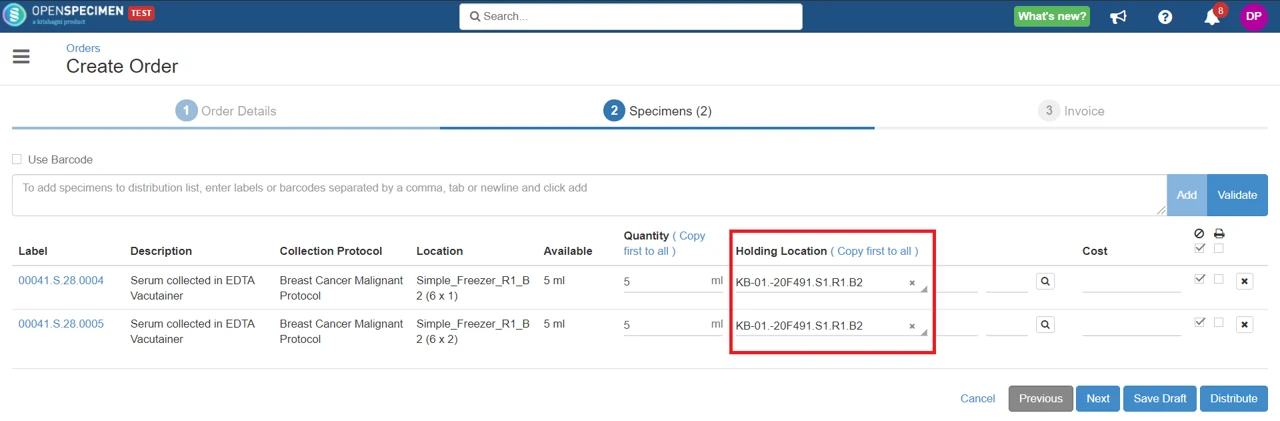
The ‘Holding Location’ field is shown in the specimens tab while distributing specimens. The dropdown will only show containers marked for ‘Distribution’.
Retrieving Specimens Stored in Holding Container
Once distributed, researchers confirm specimen pick-up. They log in, go to the order, and click the specimen tab. They will see all distributed specimens for that order, with the holding location under the ‘Location’ column.

Once the researchers retrieve the specimens, they need to click on the ‘Retrieve’ button at the top to free the holding location.
How to include the holding container in reports?
The specimen container field contains the holding location details. One specimen can be in either storage location or holding location - not both.
Reference: Holding Locations